Home / Article
What Do We Do When a Practice Applies to Only Part of Our System?
Your shop floor machine holds no Controlled Unclassified Information (CUI), but your assessor still asks about it. The question feels unfair. A practice that covers your whole company seems wrong when only one team touches CUI. Scope is the answer.
The rule that sets scope
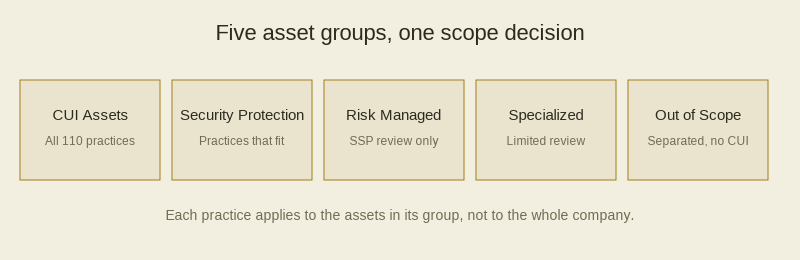
CMMC Level 2 sorts every asset into one of five groups. The rule is 32 CFR Part 170, section 170.19. CFR means the Code of Federal Regulations. The five groups are CUI Assets, Security Protection Assets, Contractor Risk Managed Assets, Specialized Assets, and Out of Scope.
CUI Assets store, process, or transmit CUI. They face all 110 practices in NIST SP 800-171 Revision 2. NIST is the National Institute of Standards and Technology. SP means Special Publication.
Security Protection Assets guard the CUI Assets. Firewalls, log servers, and identity tools sit here. They face only the practices tied to the security work they do. A firewall faces the practices on boundary protection, not the practices on paper records.
Contractor Risk Managed Assets can reach CUI, but they are not meant to. A shared workstation with access to a CUI file share is one example. The assessor checks your SSP for these assets, not all 110 practices. SSP means System Security Plan.
Specialized Assets hold CUI but resist normal controls. Test gear and factory controllers sit here. The assessor reviews how you describe them in the SSP. Out of Scope Assets cannot touch CUI at all. They sit outside the boundary, but only when real separation keeps them apart.
How to decide which part counts
Start with a full asset list. List every machine, service, and device. Then sort each one into a group. Write the reason for each choice in one line. Put the list and the reasons in your SSP.
A practice applies to the assets in its group, not to the whole company. Media protection applies to the laptops that hold CUI. It does not apply to the lobby kiosk. Remote access rules apply to the VPN gateway. They do not apply to every desktop.
If an asset could reach CUI, do not call it out of scope. A shared drive with no block on CUI is in scope. A printer on the same flat network as CUI machines is in scope. Separation must be real, not a policy line.
What evidence to collect
Collect evidence only for the assets a practice touches. For each practice, list the assets it covers. Save the proof for those assets. Leave the rest out of the evidence file.
Name the asset in each file. A scan report for the CUI laptops proves patching for those laptops. It proves nothing for the shop floor machine. The assessor reads the file name and the asset list side by side.
What assessors check
Assessors check the classification first. They ask why each asset sits in its group. They check the separation for out of scope claims. A firewall rule, a network diagram, or a locked down share proves separation. A promise does not.
Assessors also check that partial coverage stays honest. If a practice covers ten laptops, the evidence must cover ten laptops. Nine is a gap. Write a Plan of Action and Milestones (POA&M) entry for the gap. POA&M means Plan of Action and Milestones.
What to do this week
List your assets and sort them into the five groups. Write the SSP scope statement from that list. Map each practice to the assets it touches. Then collect evidence only where the map points.
Sources
- 32 CFR Part 170, Cybersecurity Maturity Model Certification (CMMC) Program, Code of Federal Regulations.
- NIST SP 800-171 Revision 2, National Institute of Standards and Technology.
- NIST SP 800-171A Revision 2, National Institute of Standards and Technology.
- Original diagram by PolicyCortex.
Next step
Want evidence pulled from your live systems instead of saved by hand? See how PolicyCortex collects it automatically.